Dvlce Duet
Two mics. One talks, the other ducks.
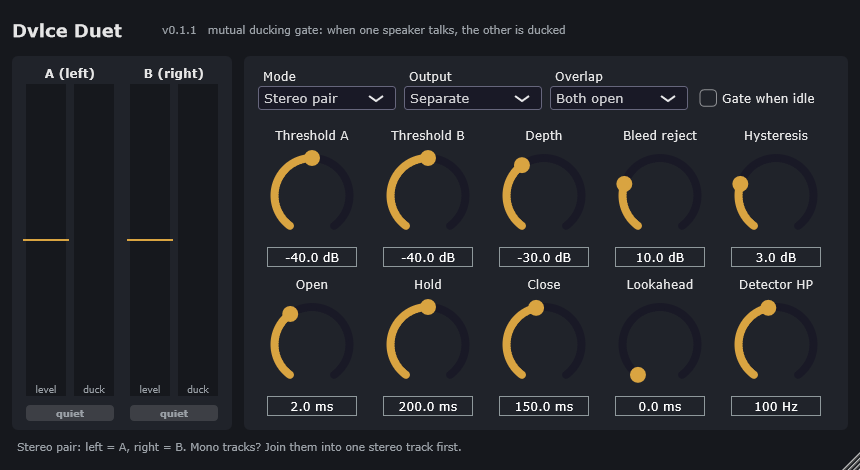
A mutual ducking gate for podcasts, interviews and dialogue. When one speaker talks, the other mic drops by a set depth. Bleed reject keeps the quiet mic ducked even though it hears the talker. Works as a stereo pair in any host, or keyed by sidechain in FL Studio and Pro Tools.
VST3 · AU · Standalone · Windows 10/11 (signed) · macOS 11+ universal (not notarised)
Two ways in
Stereo pair — any host
One stereo track: speaker A on the left, speaker B on the right. Output Separate keeps them apart; Mixed gives one centred dialogue track.
Sidechain — one per speaker
Duet on each speaker’s track, each keyed from the other. A mono or stereo key works.
In your host
Controls
Install
Windows: copy Dvlce Duet.vst3 to C:\Program Files\Common Files\VST3\ and rescan plugins.
macOS: copy the .component to ~/Library/Audio/Plug-Ins/Components/ and the .vst3 to ~/Library/Audio/Plug-Ins/VST3/. If macOS blocks it, run xattr -dr com.apple.quarantine on the plugin once.
Licence
Free for non-commercial use. If you make money with it, you need a commercial licence first.
Personal podcasts, hobby, study and non-profits are free (PolyForm Noncommercial 1.0.0). Client work, a monetised show, use inside a company, or selling or bundling it needs a licence from the author.
Ask for a commercial licence →